Disk Repair
Disk Repair utilizes the built-in Windows CHKDSK command to scan for and resolve file system errors, thereby enhancing system stability.
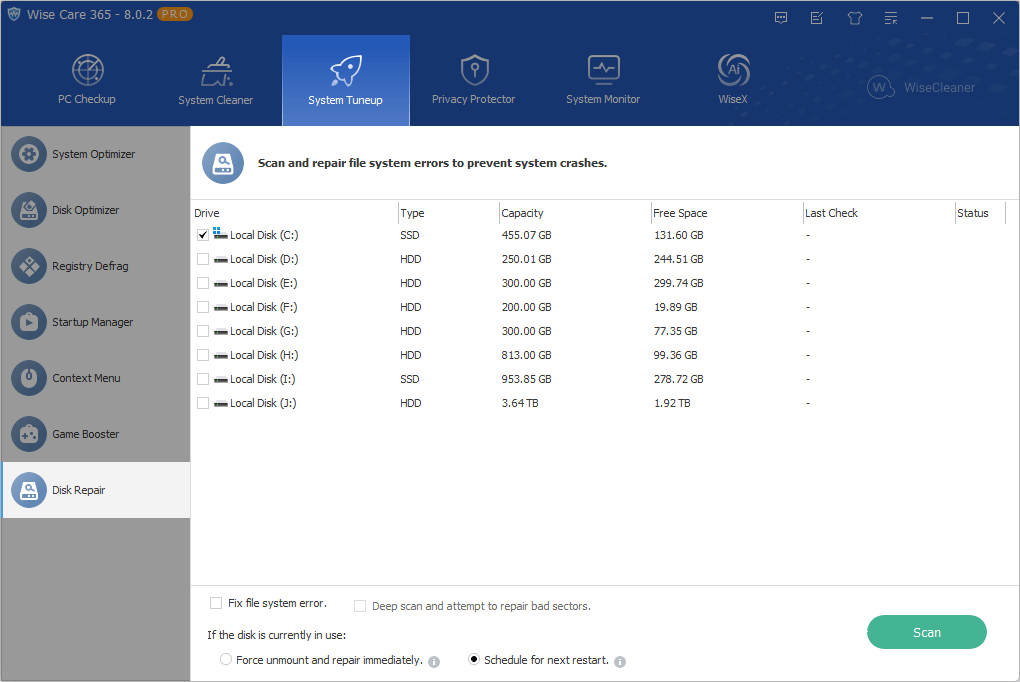
Fix file system errors
Scans the selected drive and automatically repairs any detected logical file system errors.
If this option is left unchecked, the utility will run in read-only mode—scanning for and reporting disk errors without fixing them.
Deep scan and attempt to repair bad sectors
Performs a comprehensive scan to repair logical file system errors, locate bad sectors, and attempt to recover readable data from them.
Note: If the selected drive is an SSD, this option will be disabled automatically.
Force unmount and repair immediately
If the selected drive is currently occupied by the system or other programs, checking this option will forcibly take the drive offline (dismount the volume) to close all active files and begin the repair immediately.
Risk: If an application is actively writing critical data to the drive, forcing a dismount may result in the loss of unsaved data.
Schedule for next restart
If the selected drive is currently in use and cannot be locked, enabling this option configures Windows to automatically perform the repair during the next system startup.