 ,or optimizes system, processes, and services one by one.
| How to use Wise Game Booster? |
Wise Game Booster will first search out your local games and then test your PC performance to check whether your games are in the optimum running environment.


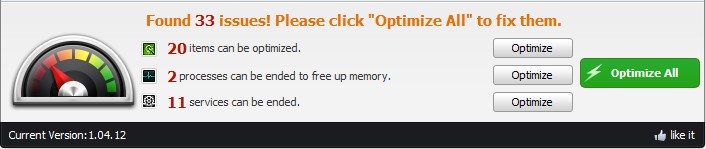
Wise Game Booster automatically optimizes your PC for game playing in one click ,or optimizes system, processes, and services one by one.
The displaying meter in the bottom left corner shows you the current condition of your PC. Green means the current environment is suitable for you to paly games, while the red means the current environment of your PC will slow down your game speed and reduce your game experience.
Please add your favorite games to Wise Game Booster by clicking  , and then your games will be listed on the main interface of Wise Game Booster.

Your PC is ready! Start your game by a double click and then enjoy it please.
Copyright 2006-2012 WiseCleaner.com All Rights Reserved.